
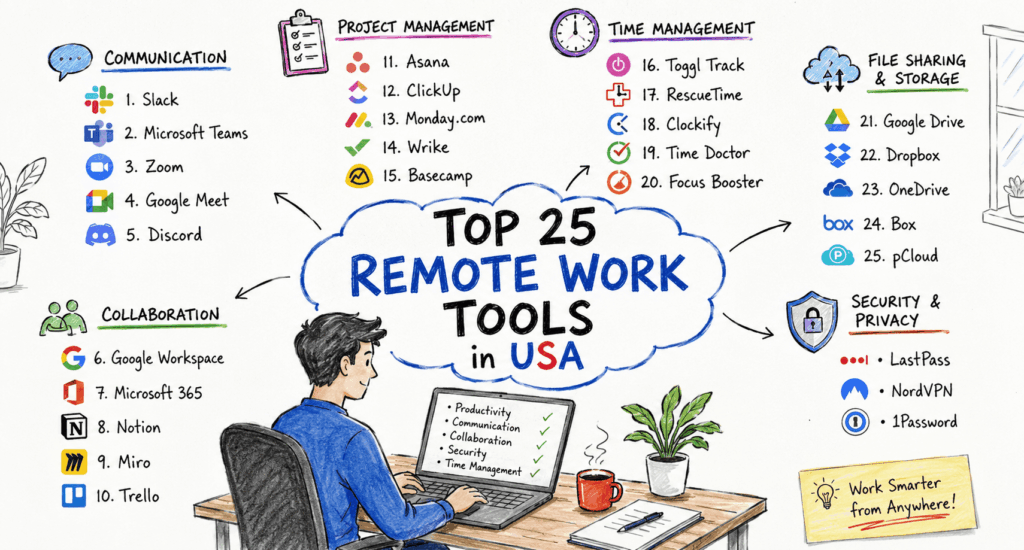
Remote work has evolved from being a temporary solution into a permanent way of doing business across the United States. From startups in Austin to enterprise companies in New York and Silicon Valley, organizations are embracing flexible work environments that allow employees to collaborate from anywhere. However, successful remote work depends on more than just a laptop and internet connection—it requires the right set of digital tools.
Today’s remote teams need reliable communication platforms, project management software, cloud storage, cybersecurity solutions, virtual meeting applications, documentation tools, and automation platforms. Choosing the right combination of software can dramatically improve productivity, reduce operational costs, and keep distributed teams connected.
In this comprehensive guide, we’ve carefully researched the **Top 25 Remote Work Tools in the USA**, evaluating them based on features, pricing, ease of use, integrations, security, customer support, and overall value for businesses of all sizes.
How We Selected These Remote Work Tools
Our recommendations are based on several important criteria:
Popularity among U.S. businesses
User reviews and satisfaction
Security and compliance
Integration capabilities
Collaboration features
Value for money
Scalability
Mobile accessibility
Customer support quality
Innovation and AI capabilities
Whether you’re a freelancer, startup founder, remote employee, HR manager, or enterprise IT administrator, this list has something for your workflow.
1. Slack
Best For
Team communication and instant collaboration
Slack remains one of America’s most popular workplace messaging platforms. Instead of cluttered email chains, Slack organizes conversations into channels, making communication much faster and easier.
Key Features
Public and private channels
Direct messaging
Voice and video calls
File sharing
AI-powered search
Workflow automation
Thousands of integrations
Pros
Easy to use
Huge integration library
Fast communication
Excellent mobile apps
Cons
Free version has message history limits
Can become noisy without proper organization
Pricing
Free plan available
Paid plans start around **$8.75/user/month**
Ideal for:
Small businesses
Startups
Large enterprises
Hybrid teams
2. Microsoft Teams
Best For
Businesses using Microsoft 365
Microsoft Teams combines messaging, meetings, file sharing, and collaboration into one workspace.
Its deep integration with Word, Excel, PowerPoint, Outlook, and OneDrive makes it especially valuable for enterprises already invested in Microsoft products.
Key Features
HD video meetings
Live captions
Team chat
Screen sharing
Collaborative documents
Enterprise security
Webinar support
Pros
Excellent Microsoft integration
Secure
Enterprise-ready
Strong meeting capabilities
Cons
Interface can feel complex for new users
Pricing
Free version available
Business plans included with Microsoft 365 subscriptions.
3. Zoom Workplace
Best For
Video conferencing and virtual meetings
Zoom became synonymous with remote work during the pandemic, but it continues to evolve with AI-powered meeting summaries, whiteboards, scheduling tools, and collaboration features.
Key Features
HD meetings
AI meeting assistant
Whiteboards
Webinar hosting
Team chat
Recording
Breakout rooms
Pros
Reliable video quality
Easy to join meetings
Excellent webinar features
Strong enterprise support
Cons
Advanced features require paid plans
Pricing
Basic Free Plan
Paid plans start aroun$15–20/month
4. Asana
Best For
Project management
Asana helps remote teams organize projects, assign tasks, track deadlines, and improve accountability.
Instead of endless email updates, everyone can see project progress in real time.
### Key Features
* Task management
* Timeline view
* Goals tracking
* Workflow automation
* Reporting dashboards
* AI project assistance
Pros
Beautiful interface
Great automation
Easy collaboration
Powerful reporting
Cons
Learning curve for advanced workflows
Pricing
Free plan available
Paid plans begin around$10–11/user/month
5. Trello
Best For
Simple project management
Trello uses Kanban boards that make project tracking incredibly visual and intuitive.
Many small businesses and freelancers love Trello because almost anyone can start using it within minutes.
Key Features
Drag-and-drop boards
Checklists
Due dates
Calendar view
Automation (Butler)
Templates
Pros
Beginner friendly
Affordabl
Clean interface
Great mobile app
Cons
Limited reporting features
Pricing
Free version available
Premium starts around $10/user/month
6. Notion
Best For
Knowledge management and documentation
Notion combines notes, documents, databases, project management, wikis, and AI writing tools into one powerful workspace.
Many remote companies use Notion as their “company brain.”
Key Features
Team wiki
Notes
AI writing assistant
Databases
Templates
Project tracking
Document collaboration
Pros
Extremely flexible
Beautiful interface
Excellent AI features
Great collaboration
Cons
Can become complex with large workspaces
Pricing
Free Personal Plan
Business plans start around $12/user/month
7. Google Workspace
Best For
Cloud productivity
Google Workspace includes Gmail, Docs, Sheets, Slides, Drive, Meet, Calendar, and Forms.
Real-time collaboration makes it one of the most essential remote work ecosystems.
Key Features
Cloud storage
Shared calendars
Video meetings
Collaborative documents
Email hosting
AI features
Admin controls
Pros
Real-time editing
Reliable cloud platform
Excellent collaboration
Easy sharing
Cons
Offline functionality isn’t as strong as desktop Office
Pricing
Business plans begin around $7/user/month
8. ClickUp
Best For
All-in-one productivity
ClickUp combines project management, documents, goals, chat, whiteboards, dashboards, and AI into one platform.
It’s often chosen by companies wanting to replace several separate tools.
Key Features
Tasks
Docs
Time tracking
Dashboards
Whiteboards
AI assistant
Automations
Pros
Extremely feature-rich
Affordable
Highly customizable
Frequent updates
Cons
Can feel overwhelming initially
Pricing
Free Forever plan
Unlimited plan starts around $7/user/month
9. Dropbox
Best For
Cloud file storage
Dropbox continues to be a trusted solution for secure file storage, sharing, synchronization, and backups.
File sync
Smart backup
Password protection
Version history
File recovery
Electronic signatures
Pros
Fast syncing
Reliable
Strong security
Easy sharing
Cons
Storage upgrades can become expensive
Pricing
Free plan available
Paid plans start around **$12/month**
10. Monday.com
Best For
Work management
Monday.com is one of the fastest-growing project management platforms in the United States.
Its colorful dashboards and automation tools help organizations manage everything from marketing campaigns to software development.
Key Features
Project boards
Dashboards
Automation
Time tracking
CRM options
Integrations
Reporting
Pros
Attractive interface
Excellent automations
Easy customization
Great reporting
Cons
Pricing increases with team size
Pricing
Free plan available
Paid plans begin around $9/user/month