
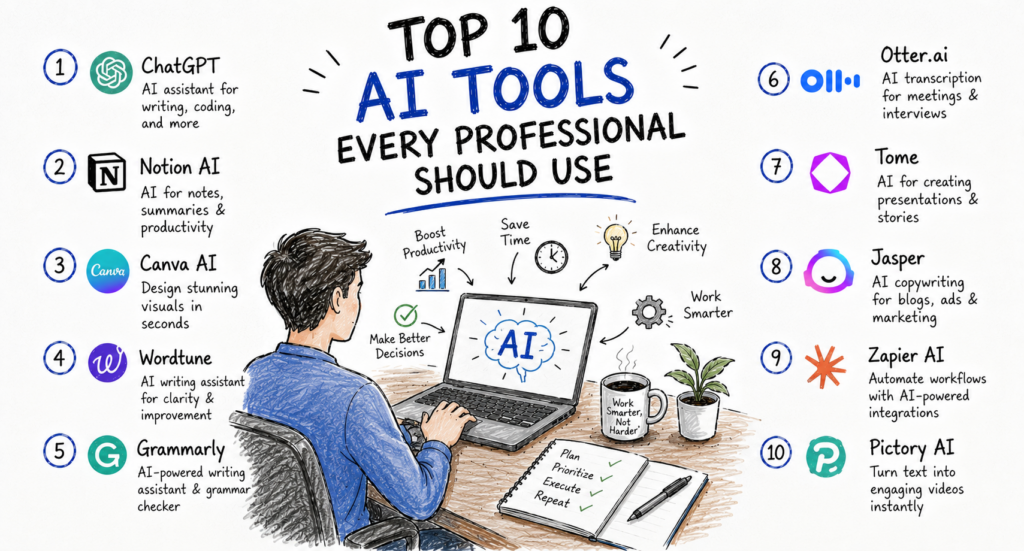
Artificial intelligence has moved far beyond being a buzzword. Across the United States, professionals in virtually every industry—from finance and healthcare to marketing, software development, education, legal services, and consulting—are using AI to improve productivity and make better decisions.
Instead of replacing human expertise, today’s AI tools are helping professionals eliminate repetitive work, organize information, draft content, summarize meetings, analyze data, write code, and collaborate more efficiently. According to multiple industry studies, organizations that successfully integrate AI into everyday workflows often see meaningful improvements in productivity, faster decision-making, and reduced administrative workload.
The growing number of AI applications, however, makes choosing the right tools difficult. Some are designed for writing, others for research, project management, coding, design, or workflow automation. Selecting software that matches your daily responsibilities can have a significant impact on efficiency.
In this guide, we review the **Top 10 AI Tools Every Professional Should Use in 2026**, evaluating them based on usability, real-world value, security, collaboration features, pricing, integrations, and overall performance for modern workplaces.
How We Selected These AI Tools
Our recommendations are based on several important criteria:
Practical business value
Ease of use
AI capabilities
Accuracy and reliability
Collaboration features
Integration with workplace software
Security and privacy controls
Pricing and value for money
Customer satisfaction
Adoption by businesses across the United States
These tools are suitable for professionals working in offices, remotely, or in hybrid environments.
1. ChatGPT
Best For
Writing, research, brainstorming, problem-solving, business communication, and everyday productivity.
ChatGPT has become one of the most versatile AI assistants available. It can help professionals draft emails, summarize lengthy reports, create presentations, brainstorm ideas, generate marketing content, explain technical concepts, analyze data, and assist with coding.
Unlike traditional software that performs a single function, ChatGPT acts as a conversational assistant capable of supporting a wide variety of business tasks. Marketing teams use it to develop campaigns, HR departments draft policies and job descriptions, consultants prepare reports, developers troubleshoot code, and entrepreneurs create business plans.
For professionals who regularly work with written communication or information, ChatGPT can significantly reduce the time spent on first drafts and repetitive tasks. Human review remains important, especially for factual accuracy, legal matters, and sensitive business decisions.
Key Features
AI writing assistance
Research support
Document summarization
Brainstorming
Coding assistance
Data analysis
Translation
Business communication
Custom AI assistants (on supported plans)
Pros
Extremely versatile
High-quality natural language
Excellent for productivity
Supports many industries
Cons
Responses should always be fact-checked before publication.
Some advanced features require a paid subscription.
Pricing
Free plan available
Paid plans begin at approximately $20 per month
Ideal For
Executives
Marketing professionals
Consultants
Students
Developers
Small-business owners
Customer support teams
2. Microsoft Copilot
Best For
Microsoft 365 users and enterprise productivity
Microsoft Copilot brings AI directly into familiar workplace applications such as Word, Excel, PowerPoint, Outlook, and Teams. Instead of switching between multiple tools, users can generate summaries, draft documents, analyze spreadsheets, create presentations, and manage emails within their existing Microsoft workflow.
For example, Copilot can summarize long email conversations, prepare meeting notes, identify trends in spreadsheets, and generate presentation slides from existing documents. Organizations already invested in Microsoft 365 often benefit from its seamless integration and enterprise-grade security.
Key Features
Word document drafting
Excel analysis
PowerPoint creation
Outlook email assistance
Teams meeting summaries
Enterprise security
AI search
Microsoft Graph integration
Pros
Deep Microsoft integration
Excellent for office productivity
Enterprise-ready
Strong security and compliance
Cons
Delivers the greatest value within the Microsoft ecosystem.
Some advanced capabilities require eligible Microsoft subscriptions.
Pricing
Available through selected Microsoft 365 subscriptions and Copilot plans.
Ideal For
Corporate employees
Finance teams
HR professionals
Managers
Enterprise organizations
3. Claude
Best For
Long-form writing, document analysis, and thoughtful business communication
Claude has become popular among professionals who work with lengthy reports, research documents, contracts, and strategic planning materials. It is known for producing clear, well-structured responses and handling long conversations effectively.
Many professionals use Claude for editing reports, summarizing policy documents, brainstorming ideas, and refining business communications. It is particularly useful when working with complex documents that require careful organization and context.
Key Features
Long-document analysis Writing assistance
Brainstorming
Business communication
Document summarization
Coding support
Research assistance
Pros
Excellent writing quality
Strong document handling
Clear explanations
Professional tone
Cons
Some advanced features are limited to paid plans.
Responses should still be verified for important business decisions.
Pricing
Free plan available
Paid subscriptions unlock higher usage limits and additional features.
Ideal For
Researchers
Consultants
Legal professionals
Business analysts
Writers
4. Grammarly
Best For
Professional writing, grammar correction, and email communication
Grammarly has evolved into an AI-powered writing assistant that helps professionals write with greater clarity, confidence, and consistency. Beyond correcting grammar and spelling, it provides suggestions for tone, readability, word choice, and sentence structure.
Professionals commonly use Grammarly while writing emails, proposals, reports, presentations, and customer communications. It integrates with web browsers, Microsoft Office, Google Docs, and many other applications.
Key Features
Grammar correction
Spell checking
AI rewriting
Tone detection
Clarity suggestions
Plagiarism detection (selected plans)
Browser extension
Microsoft Office integration
Pros
Easy to use
Excellent writing assistance
Works across multiple platforms
Saves editing time
Cons
Not designed for creating complete articles from scratch.
Premium features require a subscription.
Pricing
Free plan available
Premium plans available for individuals and businesses.
Ideal For
Office professionals
HR teams
Students
Business owners
Customer support teams
Content editors
5. Notion AI
Best For
Knowledge management, note-taking, documentation, and project organization
Notion AI extends the popular Notion workspace by adding intelligent writing, summarization, brainstorming, and organizational capabilities. Instead of switching between separate AI tools and note-taking software, users can create and improve content directly within their workspace.
Teams use Notion AI to summarize meeting notes, draft project plans, organize documentation, generate ideas, and create internal knowledge bases. It is especially valuable for businesses that rely on shared documentation and collaborative planning.
Key Features
AI writing
Meeting summaries
Brainstorming
Knowledge management
Project documentation
Content generation
Team collaboration
Workspace search
Pros
Excellent collaboration
Strong knowledge management
AI integrated into documentation
Flexible workspace
Cons
Requires familiarity with Notion for maximum benefit.
Advanced business features require paid plans.
Pricing
Free workspace available
AI capabilities are available through eligible paid plans.
Ideal For
Startups
Marketing teams
Product managers
Remote teams
Consultants
Business operations teams